UPDATE: Visualizing the COVID-19 Crisis Across the World and in the United States (5/1/20)

Introduction

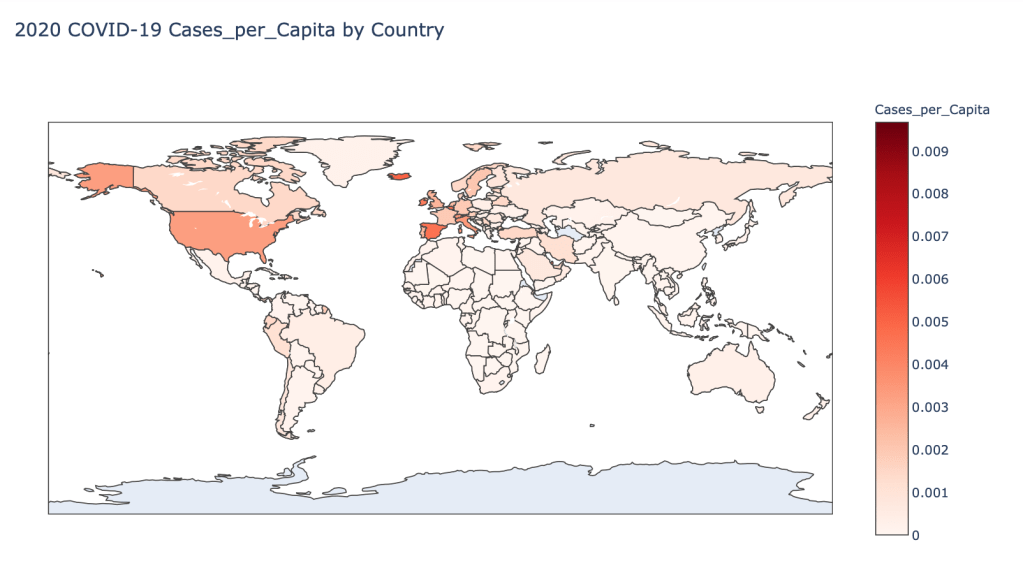
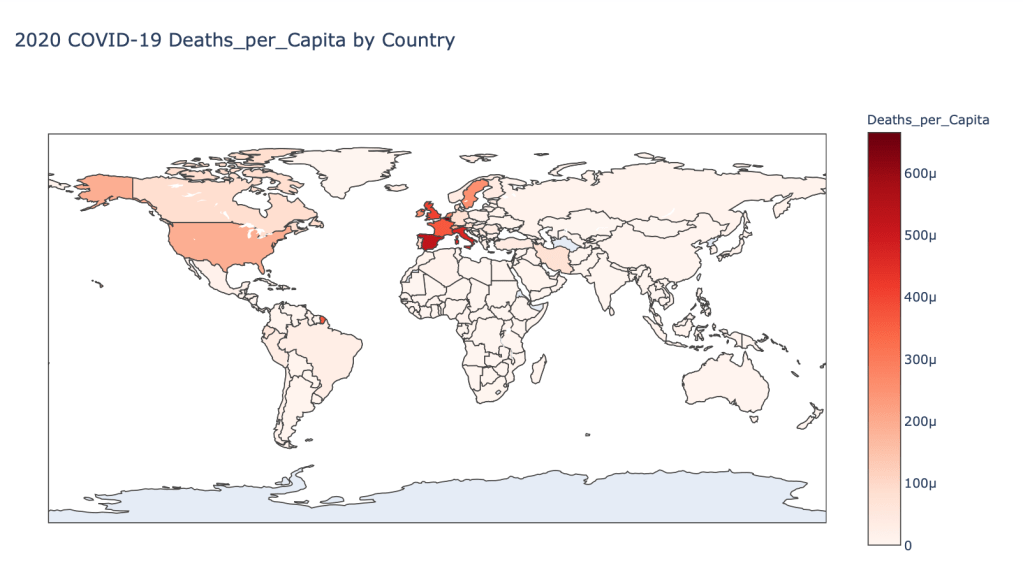
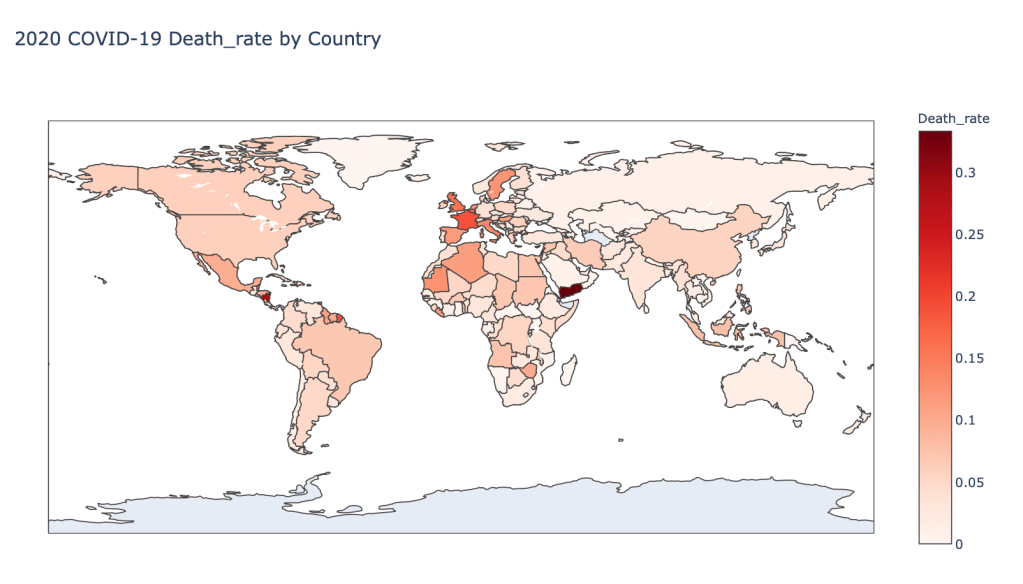
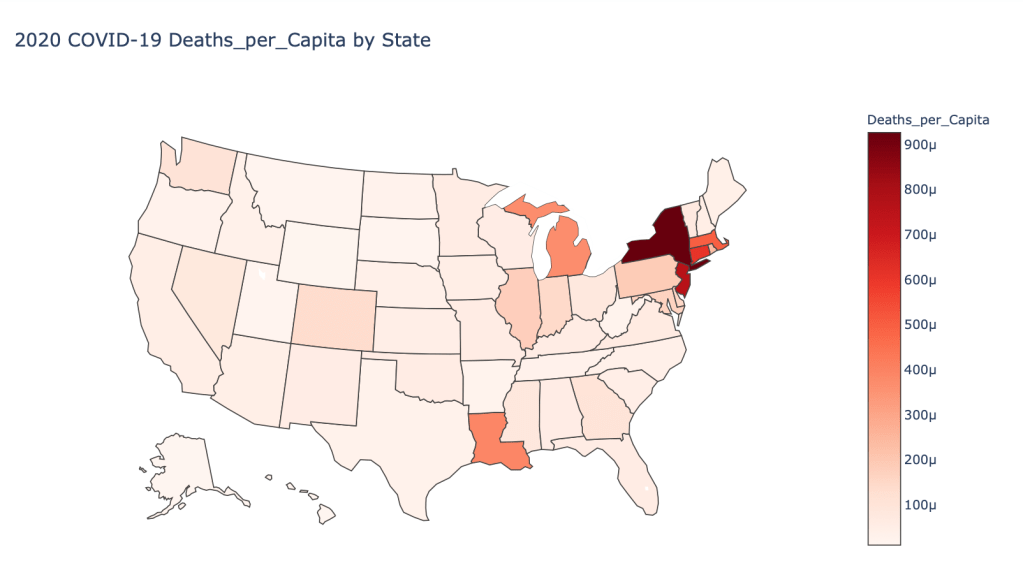
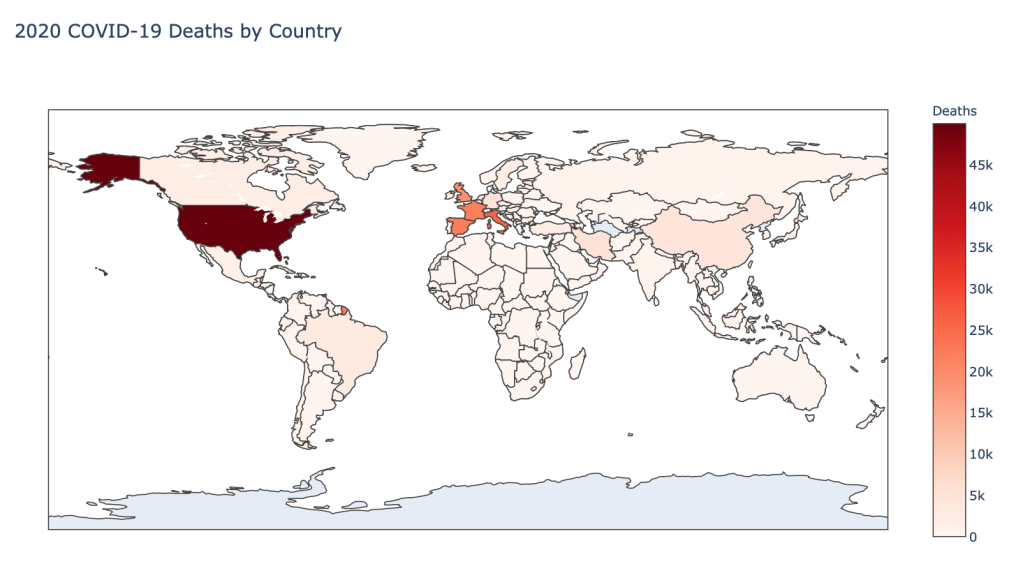
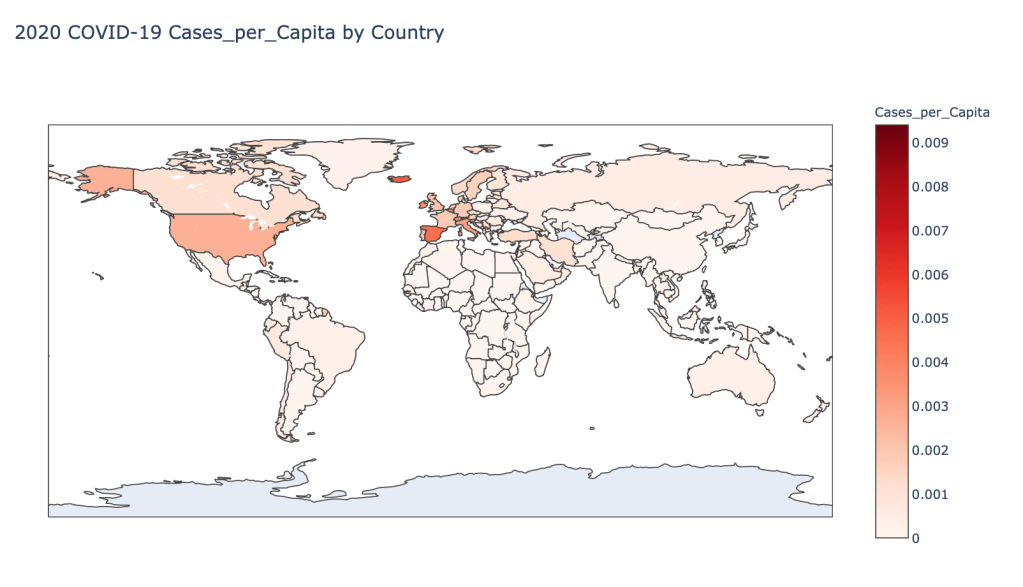
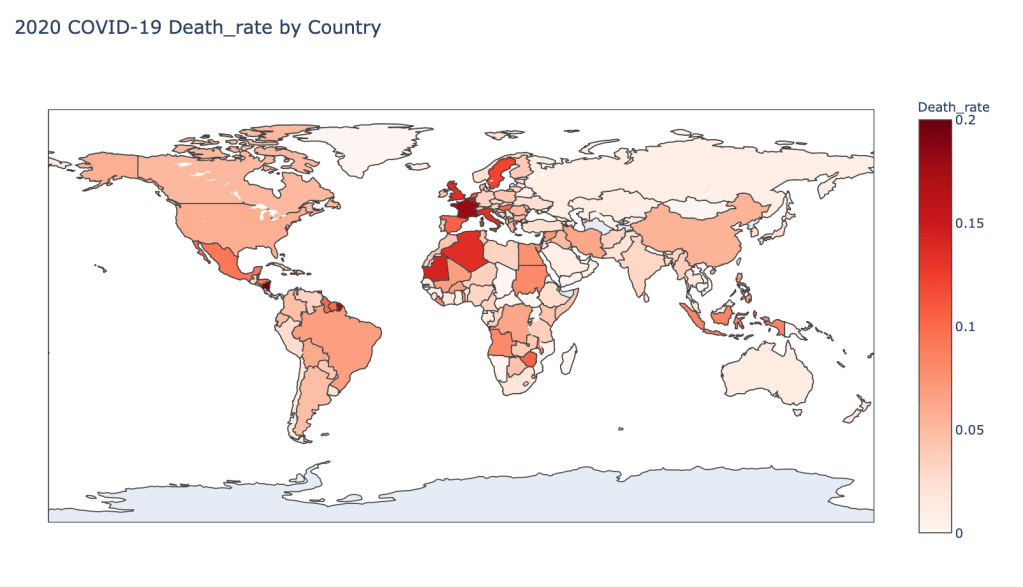
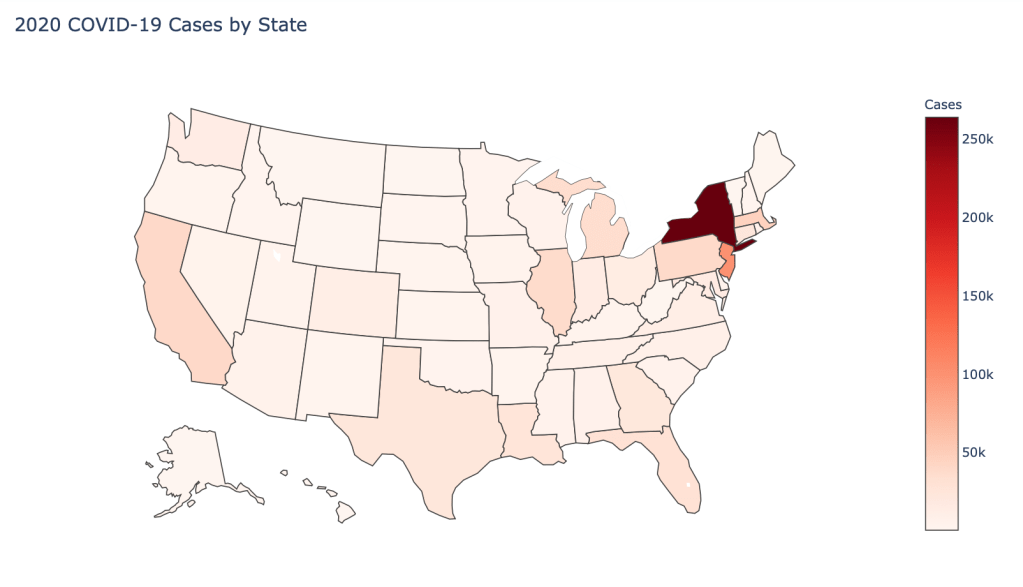
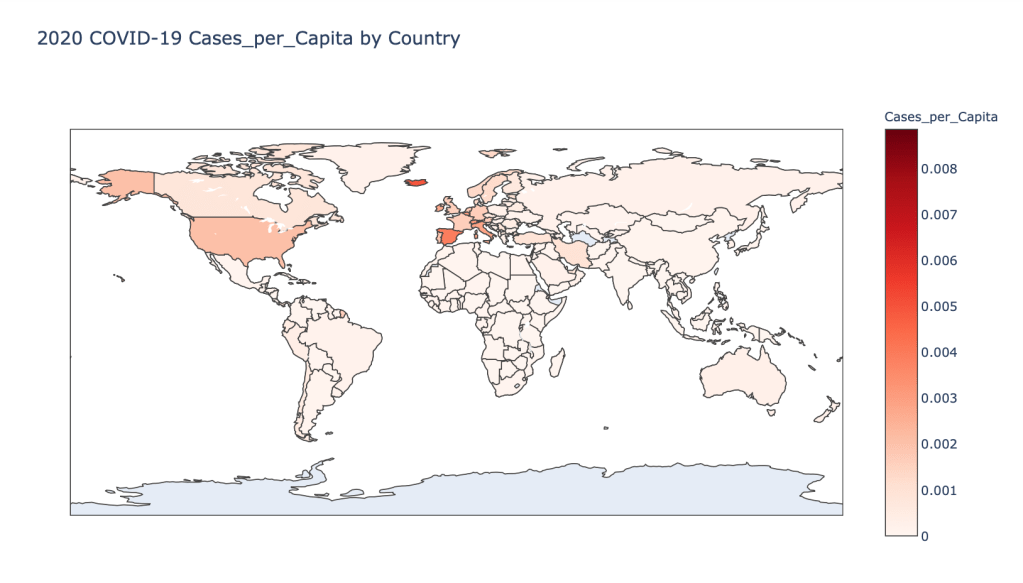
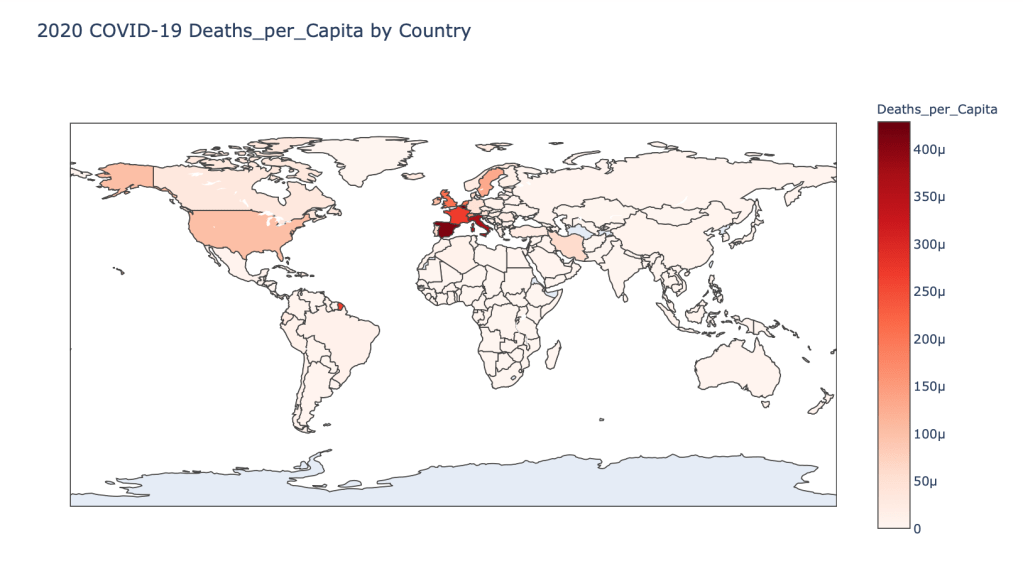
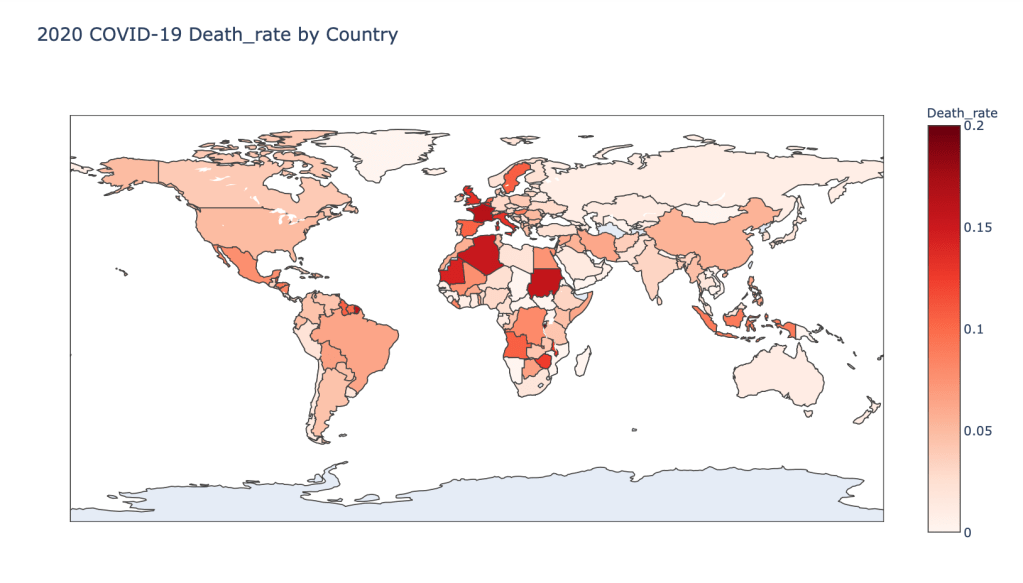
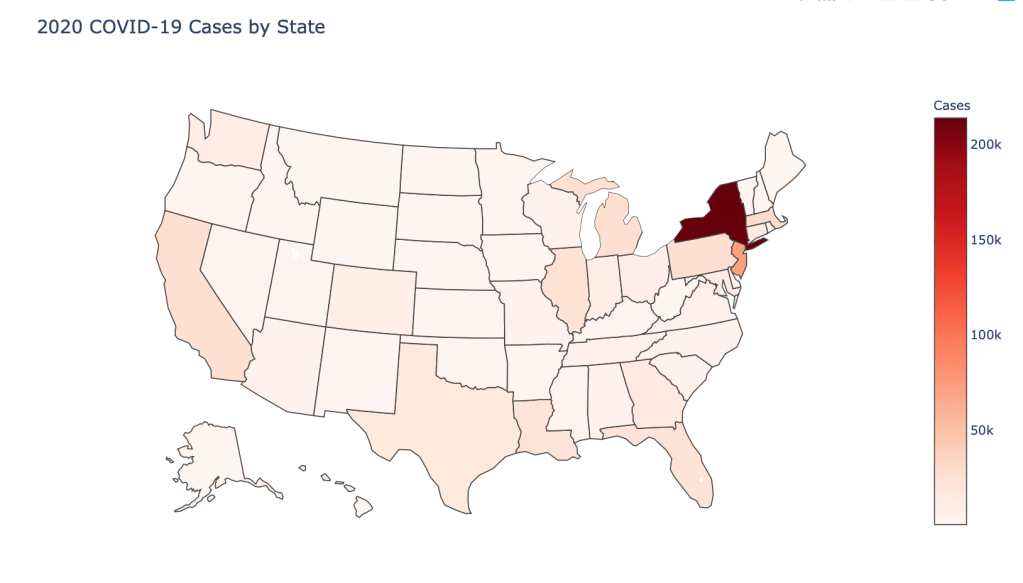
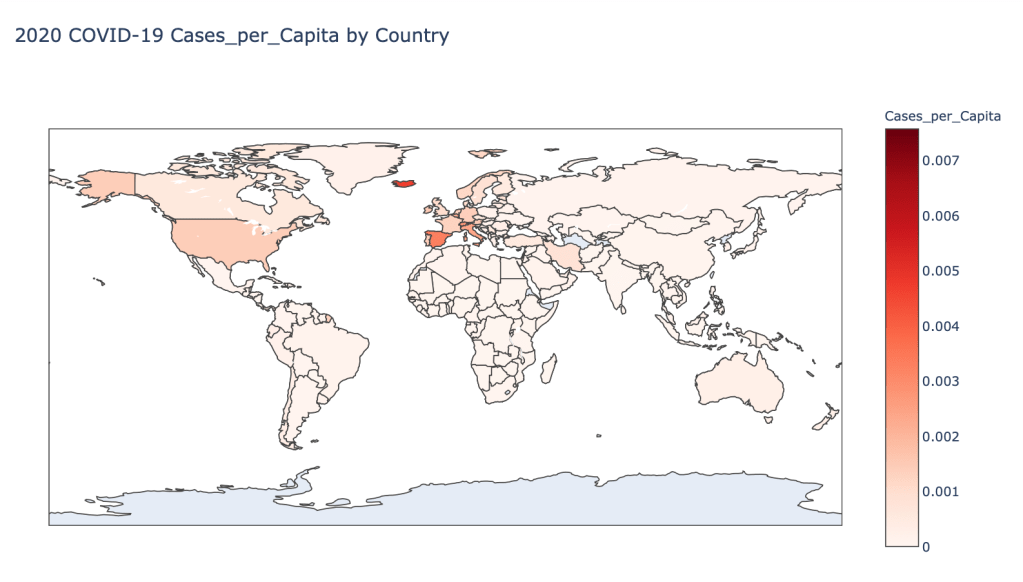
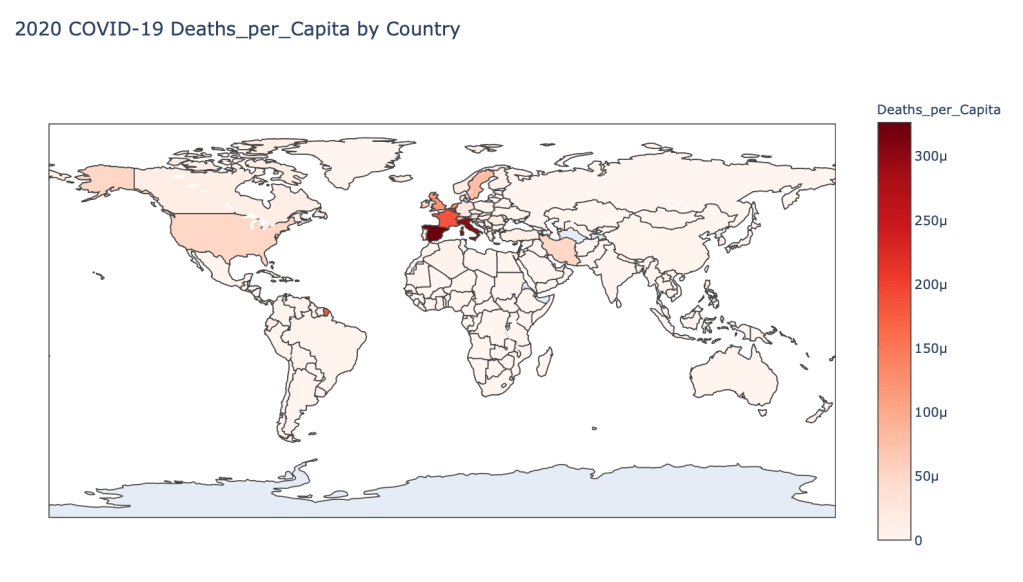
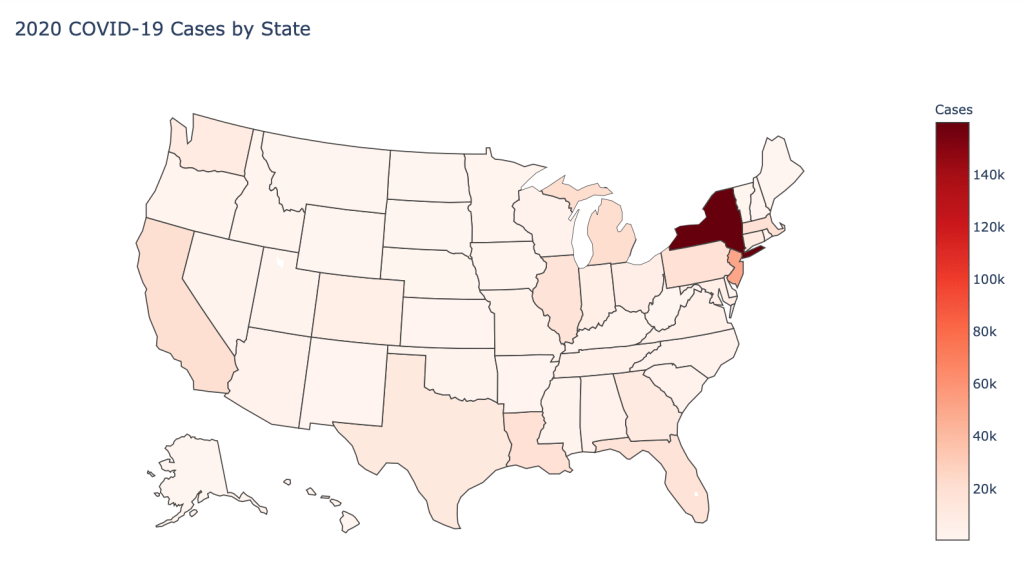
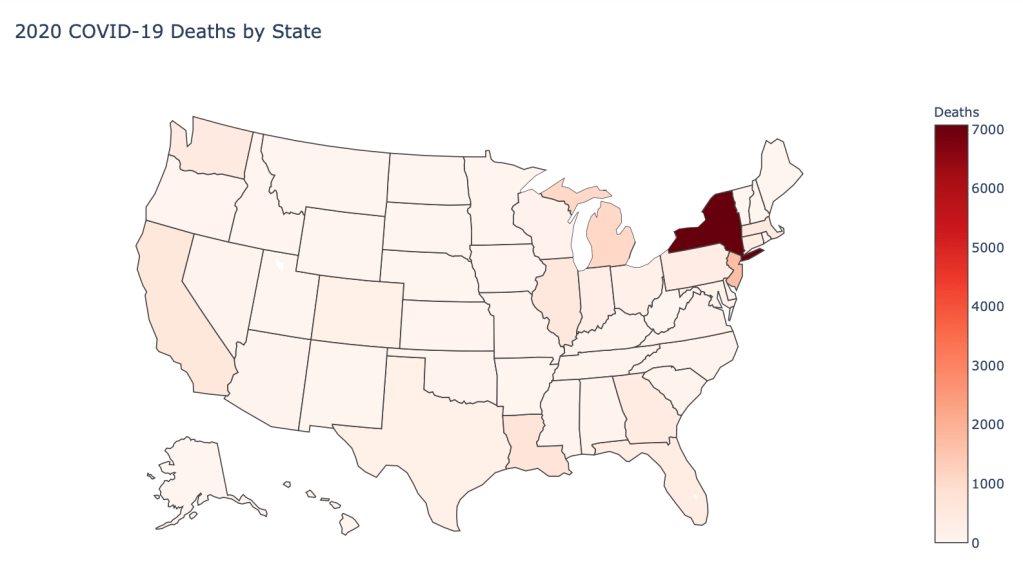
I am continuing a series of blog posts concerning the COVID-19 crisis that contain some world map visualizations and US State map visualizations of metrics I have found to be useful in analyzing the situation. COVID-19 is affecting countries all over the world and in many places the number of cases is growing exponentially everyday. This blog post with the associated Jupyter Notebook will look at different measures of how bad the outbreak is across the world and in the United States. Each metric will be displayed in a global or US choropleth map. Additionally, this exercise sets up repeatable code to use as the crisis continues and more daily data is collected.

Disclaimer

The point of this blog is not to try to develop a model or anything of the sort to detect COVID-19, as a poorly created model could cause more harm than good. This blog is simply to generate visualizations based on publicly available data about COVID-19. These visualizations will ideally help people understand the global effect of COVID-19 and the exponential pace at which cases are developing across the world and in the United States.

Data Sources

As stated in my previous blogs, the data used in this analysis is all publicly available data. The COVID-19 global daily data has been provided from the European Centre for Disease Prevention and Control. This data source is updated daily throughout the crisis and can be used to update this exercise regularly going forward. The US State level COVID-19 data has been made publicly available by the New York Times in a public GitHub Repository. In addition to the COVID-19 data, global and US state population data was used to provide per capita metrics. The global data is from The World Bank, while the US State level population data is from The United States Census Bureau.

Python Code Access

If you are interested in seeing the code used to generate these visualizations, the python code and Jupyter Notebook can be found on GitHub.

Results

To begin, previous blogs can be found here:

As a reminder, the five metrics I will be viewing at both a country level and US state level are the following:

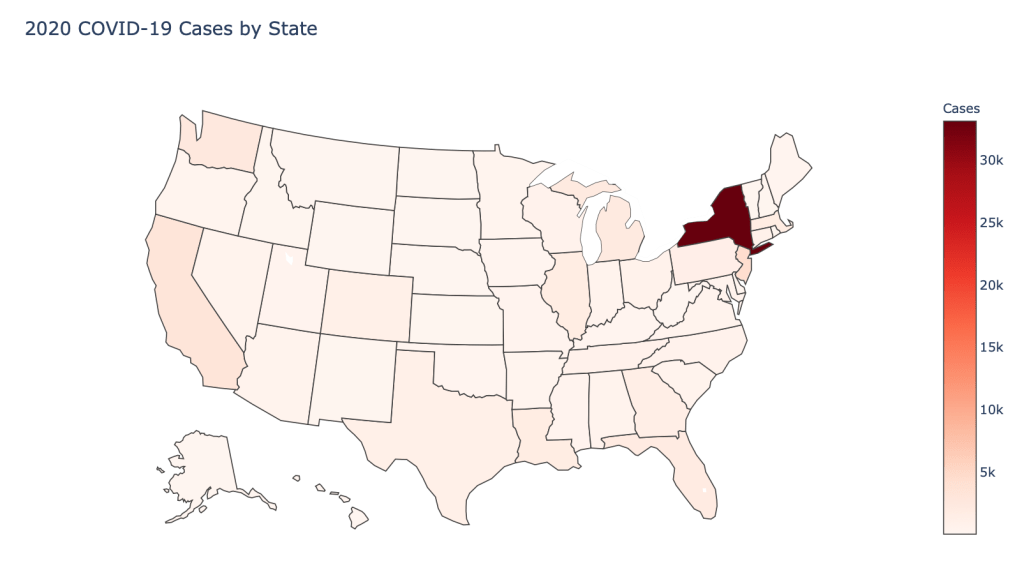
  • Number of 2020 Cumulative Cases
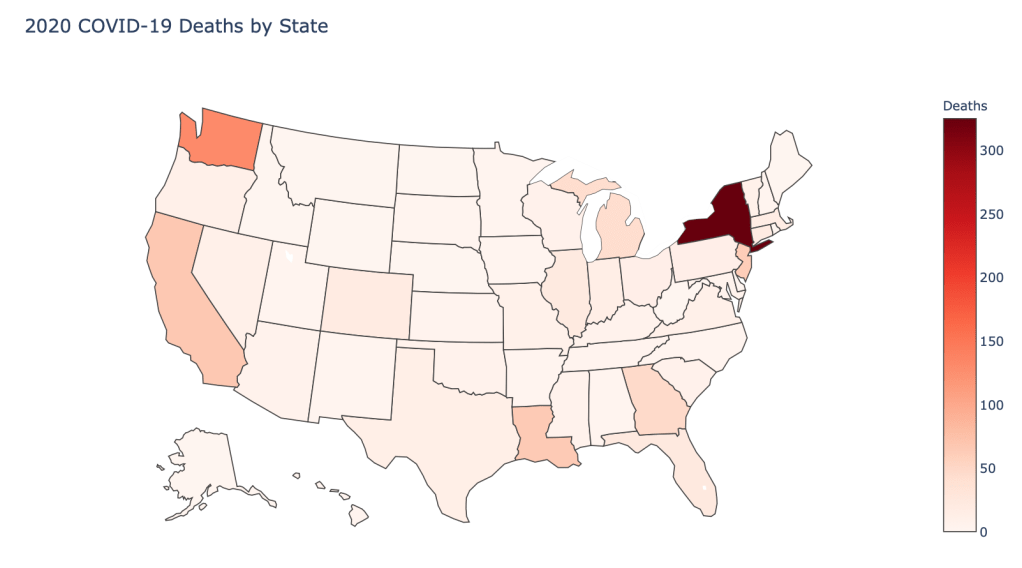
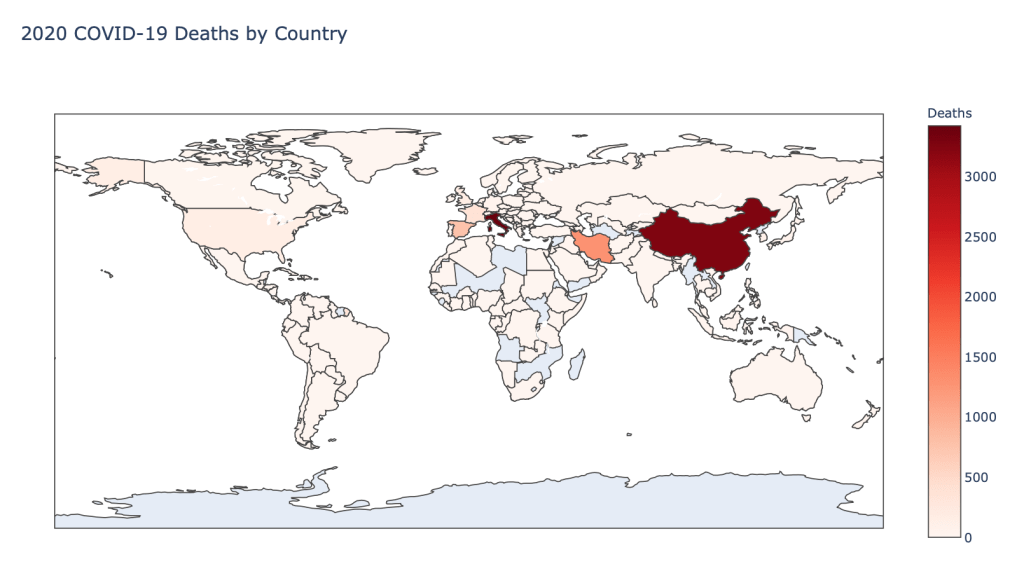
  • Number of 2020 Cumulative Deaths
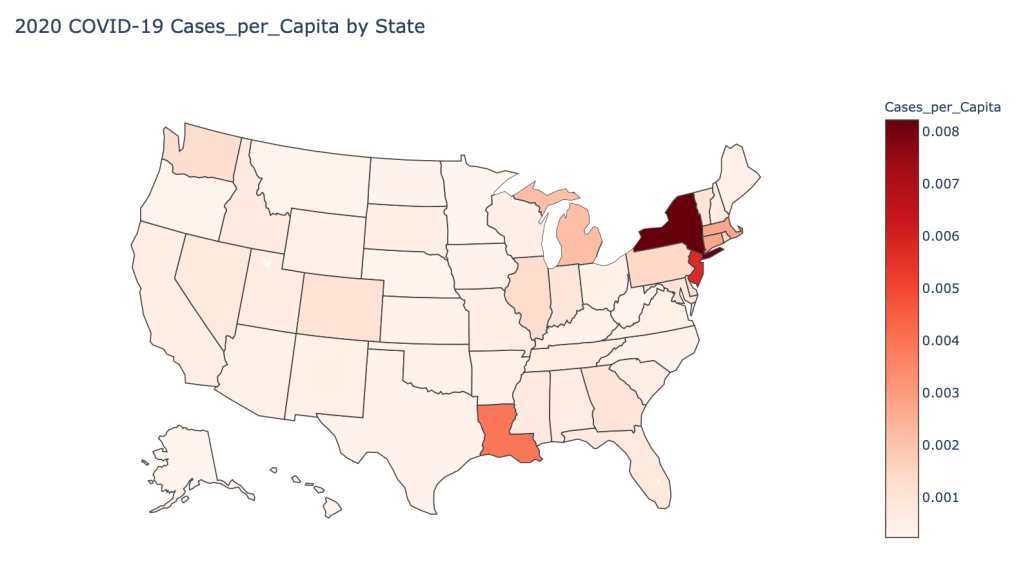
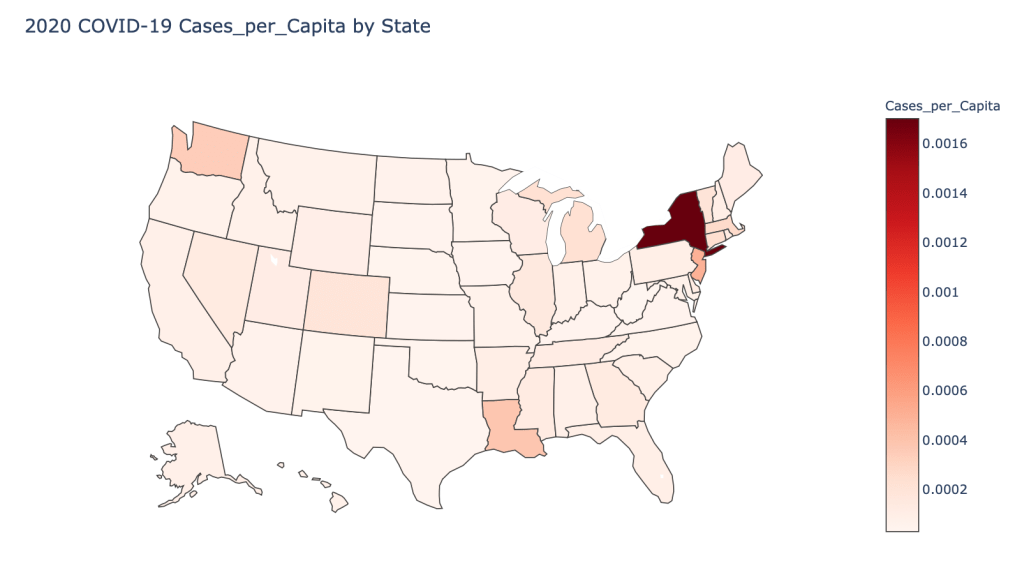
  • 2020 Cases per Capita
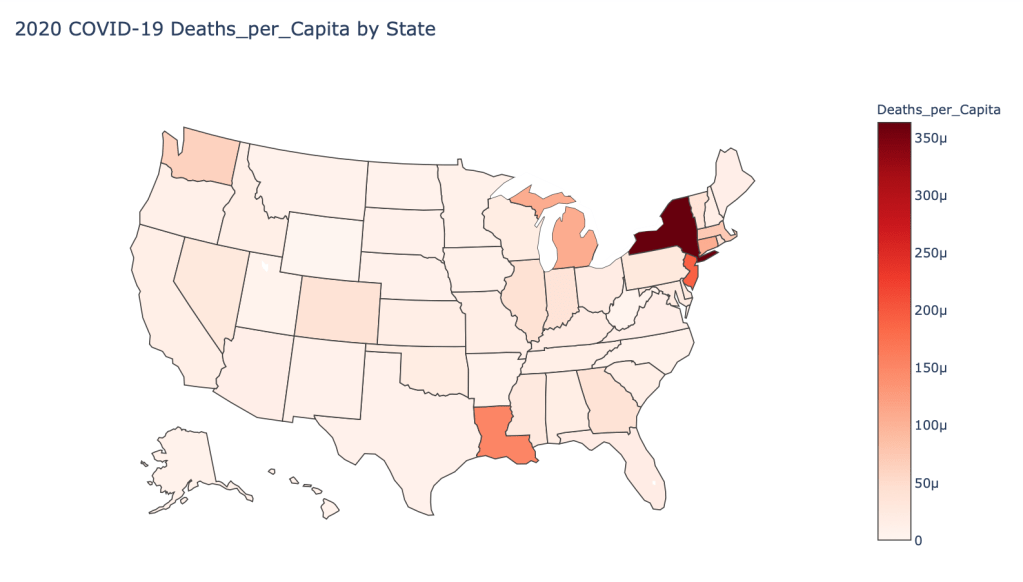
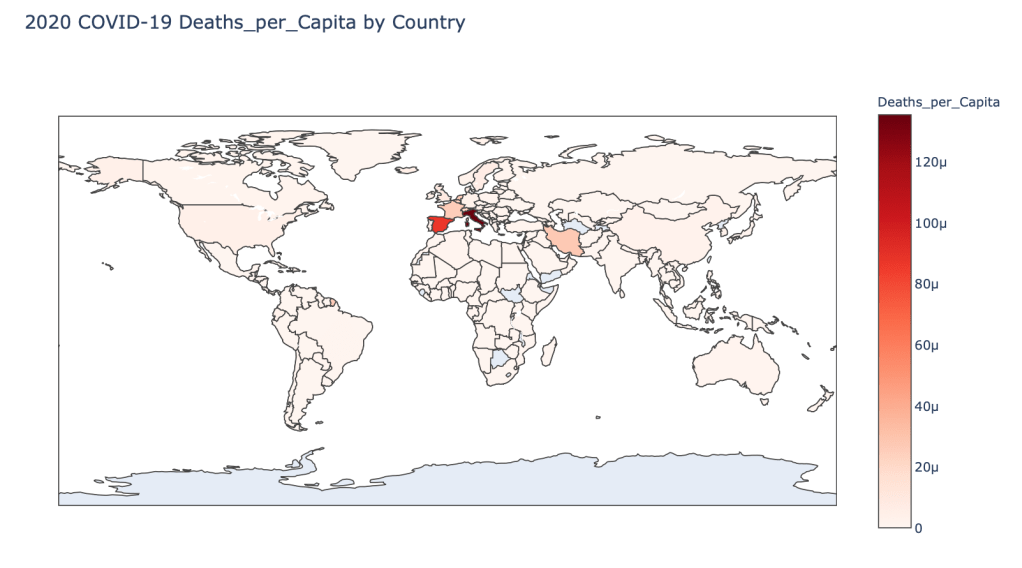
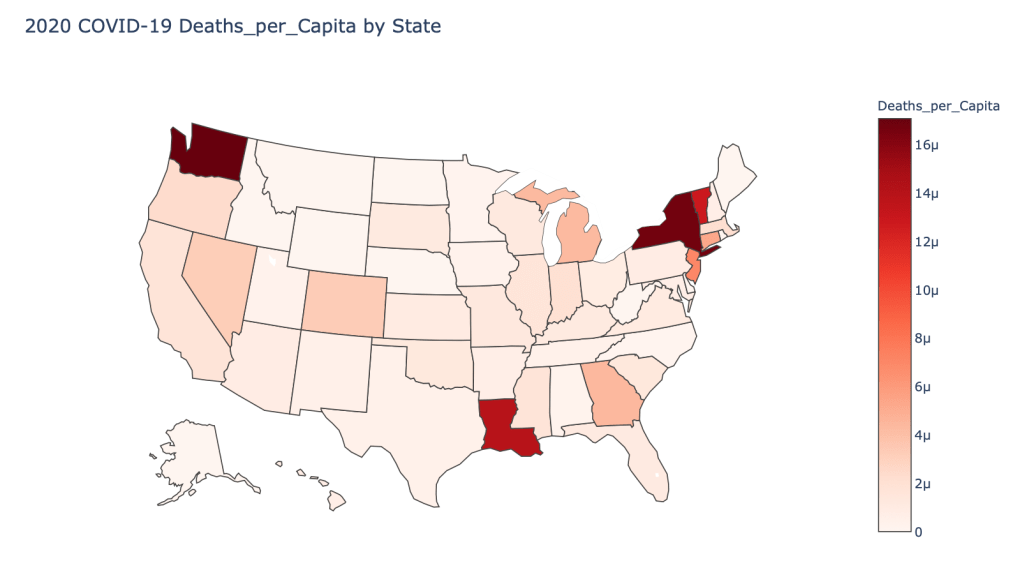
  • 2020 Deaths per Capita
  • 2020 Death Rate

In this blog post, the global results are as of 5/1/20, while the US state level results are as of 4/29/20.

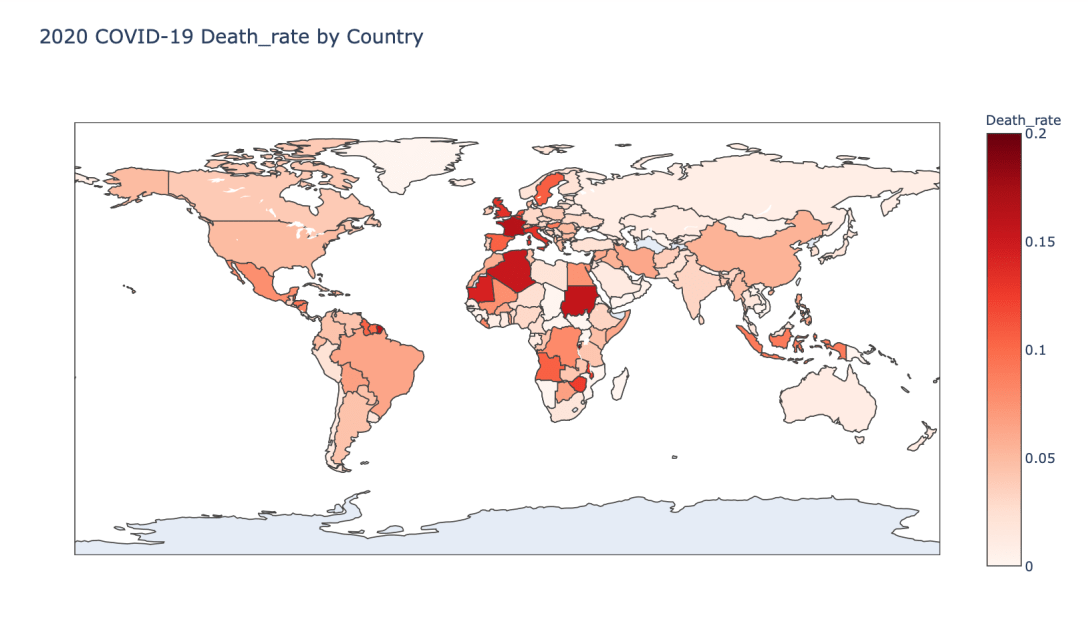
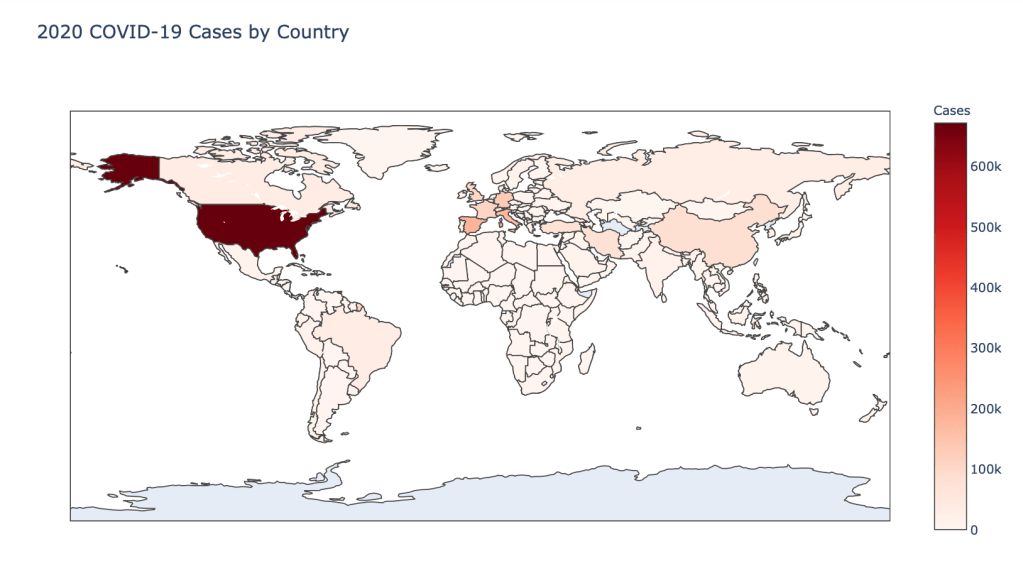
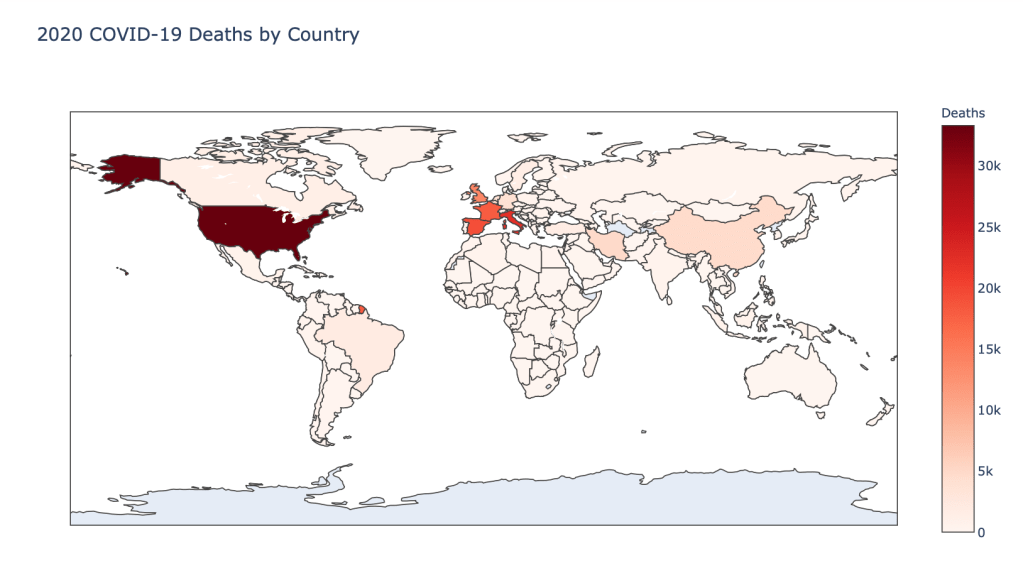
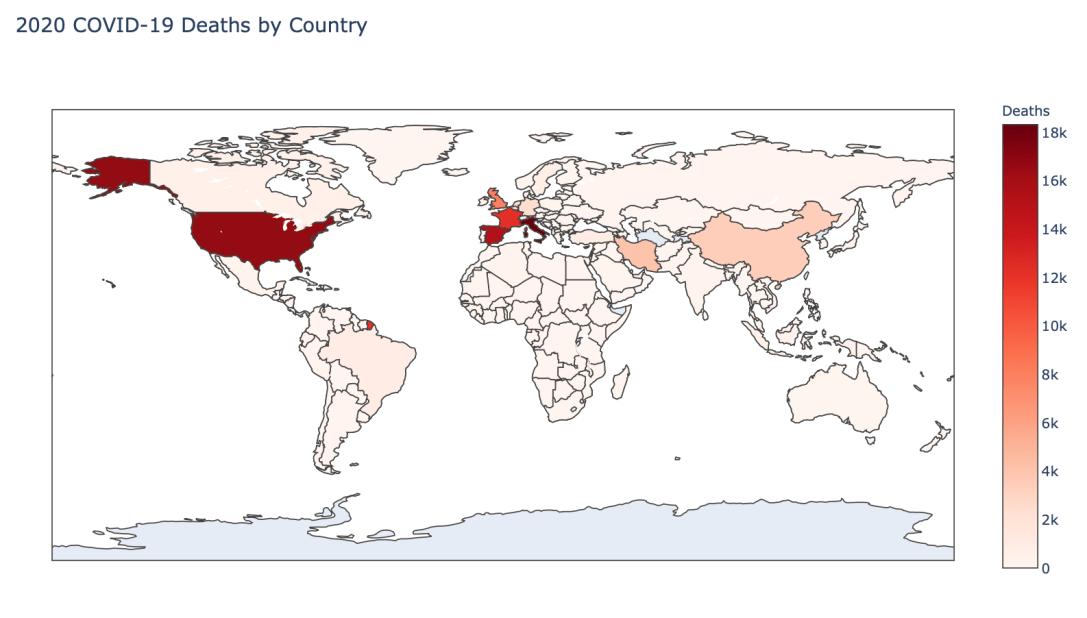
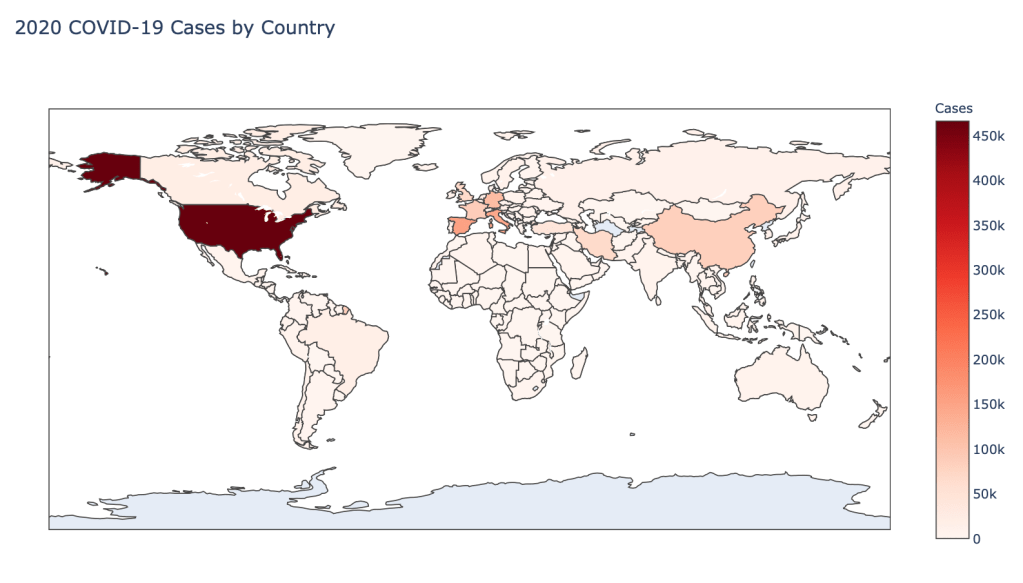
Global Results – 5/1/20

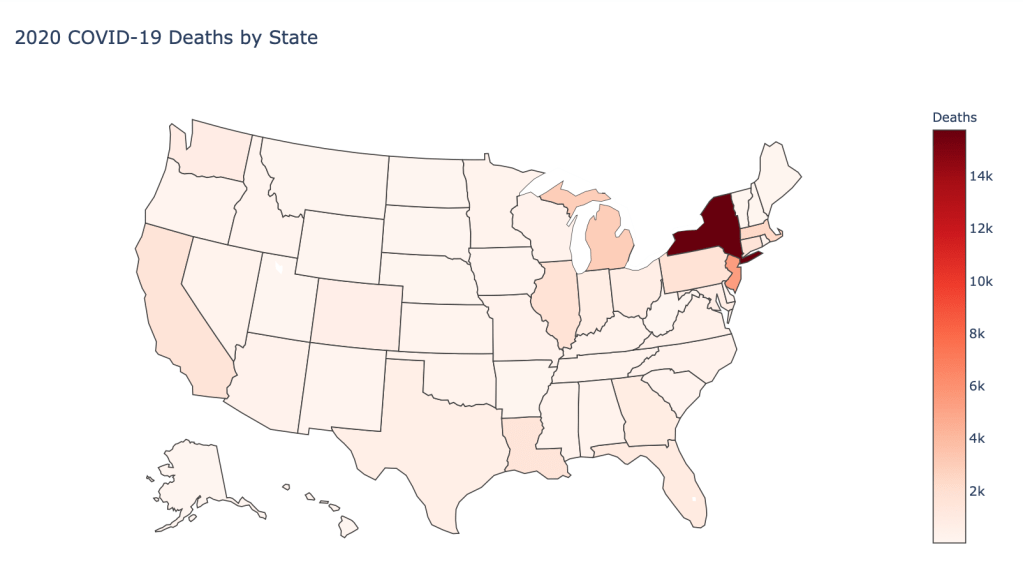
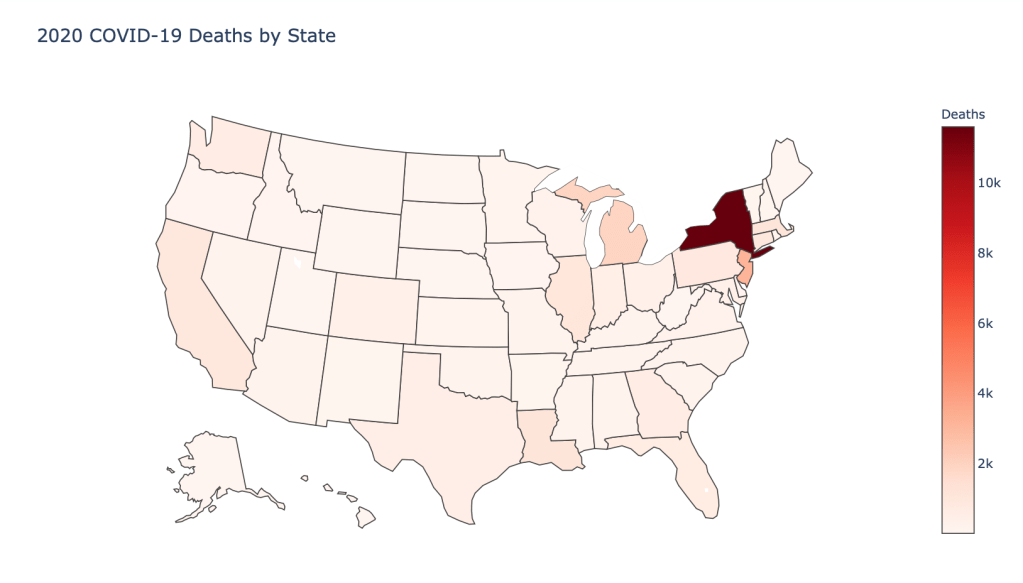
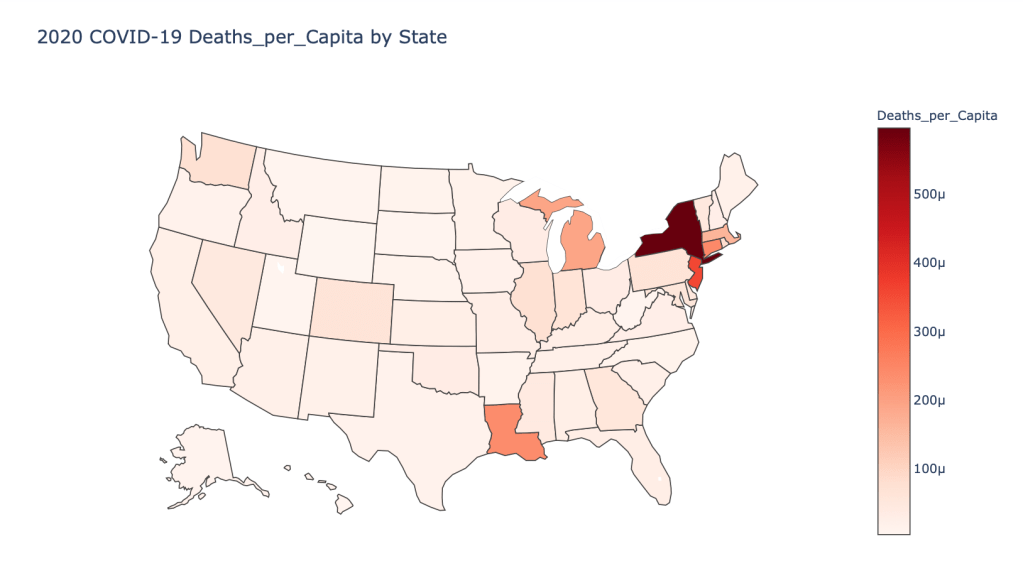
US State Level Results – 4/29/20

Conclusions

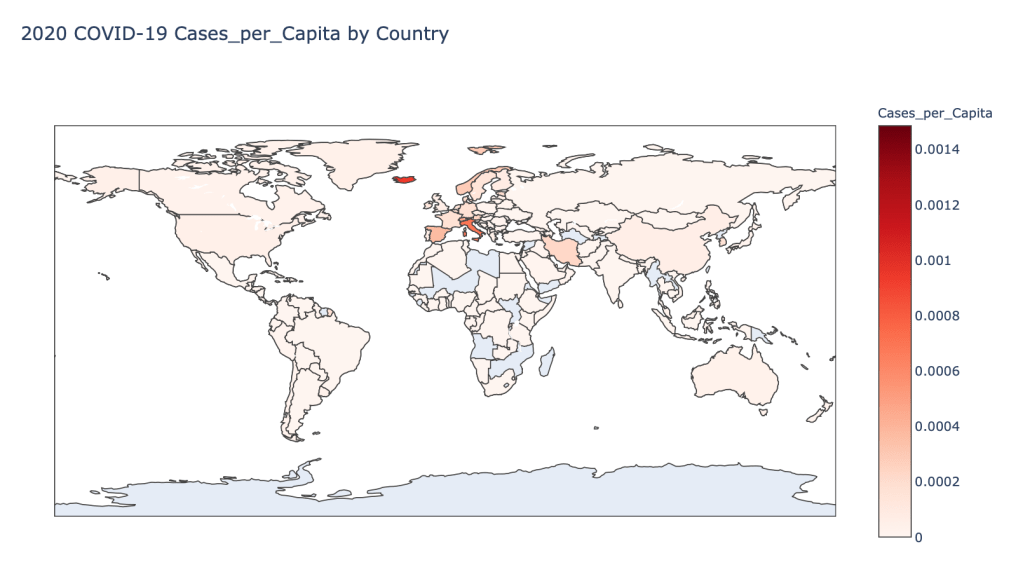
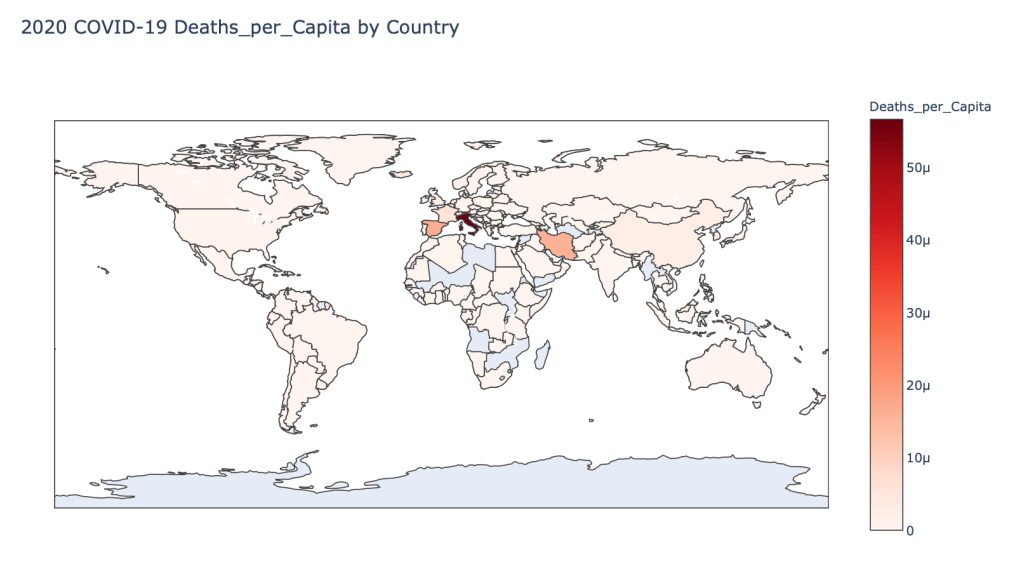
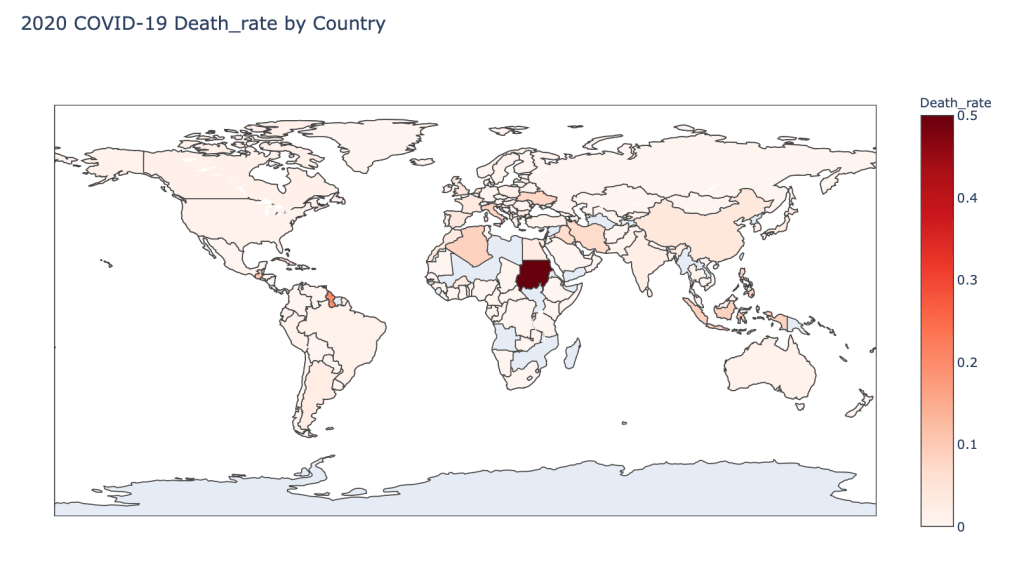
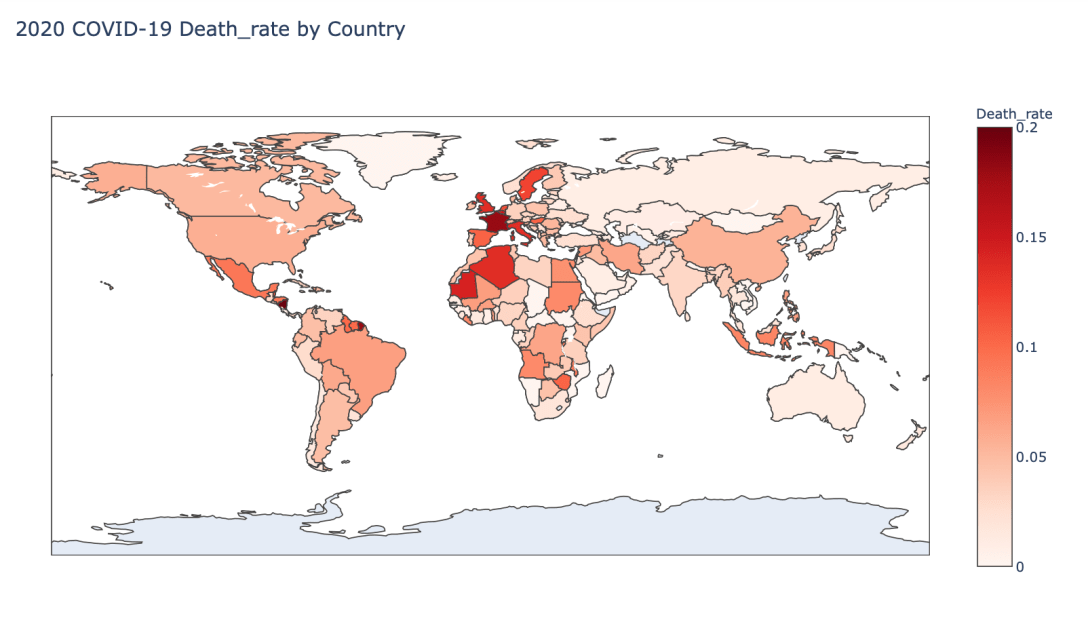
As you can see by looking at the various metrics, certain countries are handling the virus better than others. The United States has the most cases, and in comparison to the overall population, the number of cases is about as high as those of some European countries. The European countries are also struggling the most in terms of deaths per capita, with the US close behind. Death rates seem to have evened out across the globe as the virus spreads and there are less outliers. European countries seem to have the highest death rates in general, with many hovering above a 10% death rate. France has an astonishing 18.8% death rate currently. Some of these high numbers may have to do with how often tests are administered. Testing only those with intense symptoms, would show a higher death rate.

In the United States, certain states are facing worse COVID circumstances than others. The New York area has been hit the hardest, with both New York and New Jersey having a very high number of cases and deaths. In addition to the Northeast region states like Louisiana and Michigan have a lot of deaths per capita. Death rates seem to be fairly evenly spread throughout the states, with Michigan being the highest at 9%.
UPDATE: Visualizing the COVID-19 Crisis Across the World and in the United States (4/24/20)

Introduction

I am continuing a series of blog posts concerning the COVID-19 crisis that contain some world map visualizations and US State map visualizations of metrics I have found to be useful in analyzing the situation. COVID-19 is affecting countries all over the world and in many places the number of cases is growing exponentially everyday. This blog post with the associated Jupyter Notebook will look at different measures of how bad the outbreak is across the world and in the United States. Each metric will be displayed in a global or US choropleth map. Additionally, this exercise sets up repeatable code to use as the crisis continues and more daily data is collected.

Disclaimer

The point of this blog is not to try to develop a model or anything of the sort to detect COVID-19, as a poorly created model could cause more harm than good. This blog is simply to generate visualizations based on publicly available data about COVID-19. These visualizations will ideally help people understand the global effect of COVID-19 and the exponential pace at which cases are developing across the world and in the United States.

Data Sources

As stated in my previous blogs, the data used in this analysis is all publicly available data. The COVID-19 global daily data has been provided from the European Centre for Disease Prevention and Control. This data source is updated daily throughout the crisis and can be used to update this exercise regularly going forward. The US State level COVID-19 data has been made publicly available by the New York Times in a public GitHub Repository. In addition to the COVID-19 data, global and US state population data was used to provide per capita metrics. The global data is from The World Bank, while the US State level population data is from The United States Census Bureau.

Python Code Access

If you are interested in seeing the code used to generate these visualizations, the python code and Jupyter Notebook can be found on GitHub.

Results

To begin, previous blogs can be found here:

As a reminder, the five metrics I will be viewing at both a country level and US state level are the following:

  • Number of 2020 Cumulative Cases
  • Number of 2020 Cumulative Deaths
  • 2020 Cases per Capita
  • 2020 Deaths per Capita
  • 2020 Death Rate

In this blog post, the global results are as of 4/24/20, while the US state level results are as of 4/23/20.

Global Results – 4/24/20

US State Level Results – 4/23/20

Conclusions

As you can see by looking at the various metrics, certain countries are handling the virus better than others. The United States has the most cases, and in comparison to the overall population, the number of cases is about as high as those of some European countries. The European countries are also struggling the most in terms of deaths per capita. Death rates seem to have evened out across the globe as the virus spreads and there are less outliers. European countries seem to have the highest death rates in general, with many hovering above a 10% death rate. France has an astonishing 18% death rate currently. Some of these high numbers may have to do with how often tests are administered. Testing only those with intense symptoms, would show a higher death rate.

In the United States, certain states are facing worse COVID circumstances than others. The New York area has been hit the hardest, with both New York and New Jersey having a very high number of cases and deaths. In addition to the Northeast region states like Louisiana and Michigan have a lot of deaths per capita. Death rates seem to be fairly evenly spread throughout the states, with Michigan being the highest at 8.4%.

UPDATE: Visualizing the COVID-19 Crisis Across the World and in the United States (4/17/20)

Introduction

I am continuing a series of blog posts concerning the COVID-19 crisis that contain some world map visualizations and US State map visualizations of metrics I have found to be useful in analyzing the situation. COVID-19 is affecting countries all over the world and in many places the number of cases is growing exponentially everyday. This blog post with the associated Jupyter Notebook will look at different measures of how bad the outbreak is across the world and in the United States. Each metric will be displayed in a global or US choropleth map. Additionally, this exercise sets up repeatable code to use as the crisis continues and more daily data is collected.

Disclaimer

The point of this blog is not to try to develop a model or anything of the sort to detect COVID-19, as a poorly created model could cause more harm than good. This blog is simply to generate visualizations based on publicly available data about COVID-19. These visualizations will ideally help people understand the global effect of COVID-19 and the exponential pace at which cases are developing across the world and in the United States.

Data Sources

As stated in my previous blogs, the data used in this analysis is all publicly available data. The COVID-19 global daily data has been provided from the European Centre for Disease Prevention and Control. This data source is updated daily throughout the crisis and can be used to update this exercise regularly going forward. The US State level COVID-19 data has been made publicly available by the New York Times in a public GitHub Repository. In addition to the COVID-19 data, global and US state population data was used to provide per capita metrics. The global data is from The World Bank, while the US State level population data is from The United States Census Bureau.

Python Code Access

If you are interested in seeing the code used to generate these visualizations, the python code and Jupyter Notebook can be found on GitHub.

Results

To begin, previous blogs can be found here:

As a reminder, the five metrics I will be viewing at both a country level and US state level are the following:

  • Number of 2020 Cumulative Cases
  • Number of 2020 Cumulative Deaths
  • 2020 Cases per Capita
  • 2020 Deaths per Capita
  • 2020 Death Rate

In this blog post, the global results are as of 4/17/20, while the US state level results are as of 4/15/20.

Global Results – 4/17/20

US State Level Results – 4/15/20

Conclusions

As you can see by looking at the various metrics, certain countries are handling the virus better than others. The United States has the most cases, and in comparison to the overall population, the number of cases is about as high as those of some European countries. The European countries are also struggling the most in terms of deaths per capita. Death rates seem to have evened out across the globe as the virus spreads and there are less outliers. European and African countries seem to have the highest death rates in general, with many hovering around a 15% death rate. France has an astonishing 16.5% death rate currently.

In the United States, certain states are facing worse COVID circumstances than others. The New York area has been hit the hardest, with both New York and New Jersey having a very high number of cases and deaths. In addition to the Northeast region states like Louisiana and Michigan have a lot of deaths per capita. Death rates seem to be fairly evenly spread throughout the states, with Michigan being the highest at 6.9%.

UPDATE: Visualizing the COVID-19 Crisis Across the World and in the United States (4/10/20)

Introduction

I am continuing a series of blog posts concerning the COVID-19 crisis that contain some world map visualizations and US State map visualizations of metrics I have found to be useful in analyzing the situation. COVID-19 is affecting countries all over the world and in many places the number of cases is growing exponentially everyday. This blog post with the associated Jupyter Notebook will look at different measures of how bad the outbreak is across the world and in the United States. Each metric will be displayed in a global or US choropleth map. Additionally, this exercise sets up repeatable code to use as the crisis continues and more daily data is collected.
Disclaimer

The point of this blog is not to try to develop a model or anything of the sort to detect COVID-19, as a poorly created model could cause more harm than good. This blog is simply to generate visualizations based on publicly available data about COVID-19. These visualizations will ideally help people understand the global effect of COVID-19 and the exponential pace at which cases are developing across the world and in the United States.

Data Sources

As stated in my previous blogs, the data used in this analysis is all publicly available data. The COVID-19 global daily data has been provided from the European Centre for Disease Prevention and Control. This data source is updated daily throughout the crisis and can be used to update this exercise regularly going forward. The US State level COVID-19 data has been made publicly available by the New York Times in a public GitHub Repository. In addition to the COVID-19 data, global and US state population data was used to provide per capita metrics. The global data is from The World Bank, while the US State level population data is from The United States Census Bureau.

Python Code Access

If you are interested in seeing the code used to generate these visualizations, the python code and Jupyter Notebook can be found on GitHub.

Results

To begin, global results as of 3/20/20 can be found in a previous blog.

Global results as of 3/27/20 and US results as of 3/25/20 can be found in this previous blog.

As a reminder, the five metrics I will be viewing at both a country level and US state level are the following:

Number of 2020 Cumulative Cases Number of 2020 Cumulative Deaths 2020 Cases per Capita 2020 Deaths per Capita 2020 Death Rate

In this blog post, the global results are as of 4/10/20, while the US state level results are as of 4/9/20.

Global Results – 4/10/20

US State Level Results – 4/9/20

Conclusions

As you can see by looking at the various metrics, certain countries are handling the virus better than others. The United States now has the most cases, but in comparison to the overall population, the number of cases is not as high as those of some European countries. European countries like Iceland, Spain, and Italy have a high amount of cases per capita. These European countries are also struggling the most in terms of deaths per capita. Death rates seem to have evened out across the globe as the virus spreads and there are less outliers. European and African countries seem to have the highest death rates in general, with many hovering around a 15% death rate.

In the United States, certain states are facing worse COVID-19 circumstances than others. The New York area has been hit the hardest, with both New York and New Jersey having a very high number of cases and deaths. In addition to the Northeast region states like Louisiana and Michigan have a lot of deaths per capita. Death rates seem to be fairly evenly spread throughout the states.

UPDATE: Visualizing the COVID-19 Crisis Across the World and in the United States

Introduction

I wrote a blog last week concerning the COVID-19 crisis that contained some world map visualizations of metrics I find to be useful in analyzing the situation. This week I am updating my study to reflect this week’s changes as well as adding in visualizations to look at the data at the US state level. COVID-19 is affecting countries all over the world and in many places the number of cases is growing exponentially everyday. This blog post with the associated Jupyter Notebook will look at different measures of how bad the outbreak is across the world and in the United States. Each metric will be displayed in a global or US choropleth map. Additionally, this exercise sets up repeatable code to use as the crisis continues and more daily data is collected.

Disclaimer

The point of this blog is not to try to develop a model or anything of the sort to detect COVID-19, as a poorly created model could cause more harm than good. This blog is simply to generate visualizations based on publicly available data about COVID-19. These visualizations will ideally help people understand the global effect of COVID-19 and the exponential pace at which cases are developing across the world and in the United States.

Data Sources

Again, the data used in this analysis is all publicly available data. The COVID-19 global daily data has been provided from the European Centre for Disease Prevention and Control. This data source is updated daily throughout the crisis and can be used to update this exercise regularly going forward. The US State level COVID-19 data has been made publicly available by the New York Times in a public GitHub Repository. In addition to the COVID-19 data, global and US state population data was used to provide per capita metrics. The global data is from The World Bank, while the US State level population data is from The United States Census Bureau.

Python Code Access

If you are interested in seeing the code used to generate these visualizations, the python code and Jupyter Notebook can be found on GitHub.

Results

To begin, global results as of 3/20/20 can be found in previous blog.

As a reminder, the five metrics I will be viewing at both a country level and US state level are the following:

  • Number of 2020 Cumulative Cases
  • Number of 2020 Cumulative Deaths
  • 2020 Cases per Capita
  • 2020 Deaths per Capita
  • 2020 Death Rate

In this blog post, the global results are as of 3/27/20, while the US state level results are as of 3/25/20.

Global Results – 3/27/20

US State Level Results – 3/25/20

Conclusions

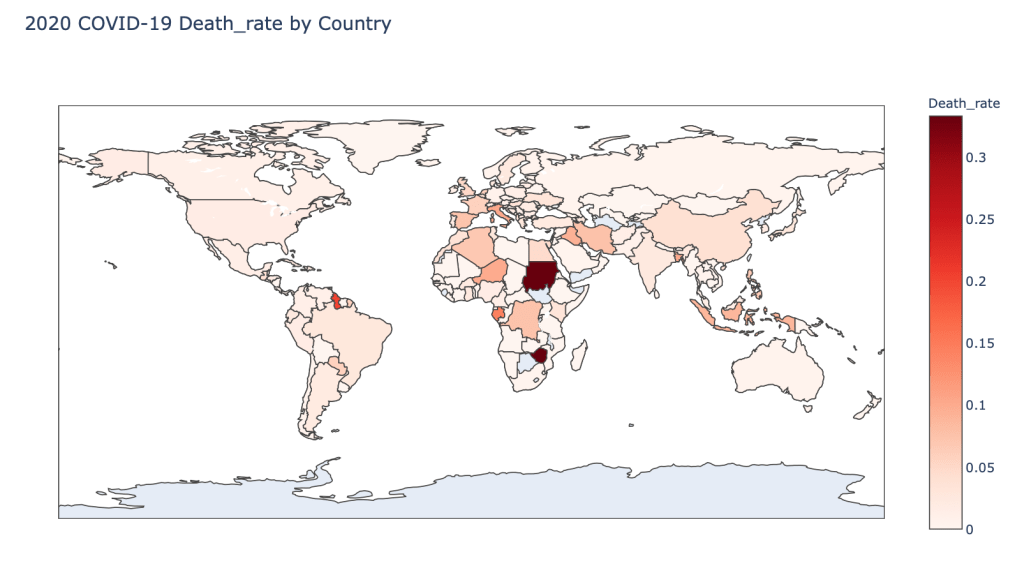
As you can see by looking at the various metrics, certain countries are handling the virus better than others. China and the United States have many cases, but in comparison to their overall population, the number of cases is not that high. European countries like Iceland, Spain, and Italy have a high amount of cases per capita. Unfortunately, when looking at the death rates, places with less medical resources seem to have higher death rates, such as Sudan, Zimbabwe or Guyana, caveat these rates with very low number of cases so far however. European countries on the other hand are not low either with high numbers of cases.

In the United States, certain states are facing worse COVID-19 circumstances than others. New York, Washington, and California have a lot of cases. States like Louisiana, Vermont, Washington, and New York have a lot of deaths per capita. Death rates seem to be fairly evenly spread throughout the states.

Visualizing the COVID-19 Crisis Across the World

Introduction

The COVID-19 crisis is affecting countries all over the world. This blog post with the associated Jupyter Notebook will look at different measures of how bad the outbreak is across the world. Each metric will be displayed in a global choropleth map. Additionally, this exercise sets up repeatable code to use as the crisis continues and more daily data is collected.

Data Sources

The data used in this analysis is all open source data. The COVID-19 daily data has been provided from the European Centre for Disease Prevention and Control. This data source is updated daily throughout the crisis and can be used to update this exercise regularly. In addition to the COVID-19 data, global population data was used to provide per capita metrics. This data is from The World Bank.

Python Code Access

The python code and Jupyter Notebook used to generate these results can be found here.

Results

The main goal of this exercise was to create visualizations showing metrics for different countries across the globe. Therefore, each of five metrics are shown as global Choropleth maps. The five metrics that are displayed are:

  • Number of 2020 Cumulative Cases
  • Number of 2020 Cumulative Deaths
  • 2020 Cases per Capita
  • 2020 Deaths per Capita
  • 2020 Death Rate

The maps shown here represent cases through 3/20/20. Although the code can be used to generate results for any date of 2020 prior to 3/20/20.

Conclusion

As you can see by looking at the various metrics, certain countries are handling the virus better than others. China has many cases, but in comparison to their overall population, the number of cases is not that high. Countries like Iceland and Italy have a high amount of cases per capita. Unfortunately, when looking a the death rates, places with less resources seem to have higher rates, such as Sudan or Guyana.

Global Clean Energy Maps

Maps Using Plotly.Express

Blog Background

I came across a dataset that I thought would be very interesting on the Kaggle Datasets webpage. This dataset includes UN Data about International Energy Statistics. After looking through the dataset a bit with some typical ETL processes, I decided I would compare "clean" and "dirty" energy production in countries across the globe.

ETL

import numpy as np
import pandas as pd
import matplotlib.pyplot as plt
%matplotlib inline

df = pd.read_csv('all_energy_statistics.csv')

df.columns = ['country','commodity','year','unit','quantity','footnotes','category']
elec_df = df[df.commodity.str.contains
                  ('Electricity - total net installed capacity of electric power plants')]

Next Steps

I began by adding up all of the "clean" energy sources, which in this case included (solar, wind, nuclear, hydro, geothermal, and tidal/wave). I created a function to classify the energy types:

def energy_classifier(x):
    label = None
    c = 'Electricity - total net installed capacity of electric power plants, '
    if x == c + 'main activity & autoproducer' or x == c + 'main activity' or x == c + 'autoproducer':
        label = 'drop'
    elif x == c + 'combustible fuels':
        label = 'dirty'
    else:
        label = 'clean'
    return label

Next, I applied this function and dropped the unnecessary rows in the dataset.

elec_df['Energy_Type'] = elec_df.commodity.apply(lambda x: energy_classifier(x))
drop_indexes = elec_df[elec_df.Energy_Type == 'drop'].index
elec_df.drop(drop_indexes, inplace = True)

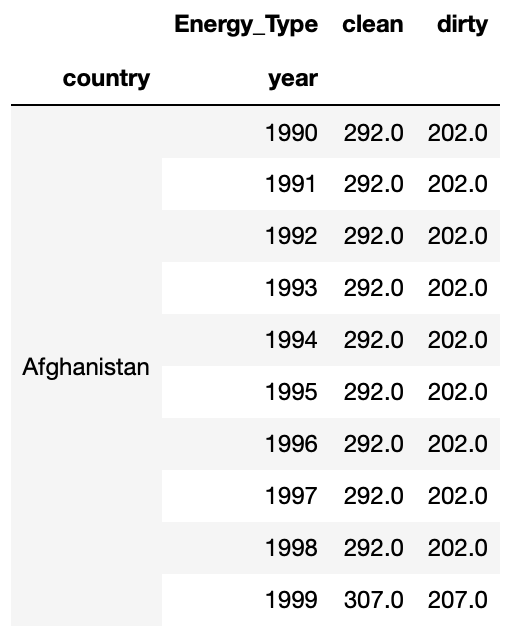
To follow, I pivoted the data into a more useful layout with a sum of energy production for clean and dirty energy.

clean_vs_dirty = elec_df.pivot_table(values = 'quantity', index = ['country', 'year'], columns = 'Energy_Type', aggfunc = 'sum', fill_value = 0)

At this point my data looked like this:

Mapping Prepwork

For simplicity sake, I decided to add a marker of 1 if a country produced more clean energy than dirty energy (otherwise 0). This was accomplished with the following function and application:

def map_marker(df):
    marker = 0
    if df.clean >= df.dirty:
        marker = 1
    else:
        marker = 0
    return marker

clean_vs_dirty['map_marker'] = (clean_vs_dirty.clean >= clean_vs_dirty.dirty)*1

Next, I needed to add the proper codes for the countries that would correspond to mapping codes. I used the Alpha 3 Codes, which can be found here. I imported these codes as a dictionary and applied them to my Dataframe with the following code:

#The following line gives me the country name for every row
clean_vs_dirty.reset_index(inplace = True)

df_codes = pd.DataFrame(clean_vs_dirty.country.transform(lambda x: dict_alpha3[x]))
df_codes.columns = ['alpha3']
clean_vs_dirty['alpha3'] = df_codes

Great! Now I’m ready to map!

Mapping

I wanted to use a cool package I found called plotly.express. It is an easy way to create quick maps. I started with the 2014 map, which I accomplished with the following python code:

clean_vs_dirty_2014 = clean_vs_dirty[clean_vs_dirty.year == 2014]

import plotly.express as px
    
fig = px.choropleth(clean_vs_dirty_2014, locations="alpha3", color="map_marker", hover_name="country", color_continuous_scale='blackbody', title = 'Clean vs Dirty Energy Countries')
fig.show()

This code produced the following map, where blue shaded countries produce more clean energy than dirty energy and black shaded countries produce more energy through dirty sources than clean sources:

You can see here that many major countries, such as the US, China, and Russia were still producing more dirty energy than clean energy in 2014.

Year by Year Maps

As a fun next step, I decided to create a slider using the ipywidgets package to be able to cycle through the years of maps for energy production data. With the following code (and a little manual gif creation at the end) I was able to create the gif map output below, which shows how the countries have changed from 1992 to 2014.

def world_map(input_year):
    
    fig = px.choropleth(clean_vs_dirty[clean_vs_dirty.year == input_year], locations="alpha3", color="map_marker", hover_name="country", color_continuous_scale='blackbody', title = 'Clean vs Dirty Energy Countries')
    fig.show()

import ipywidgets as widgets
from IPython.display import display

year = widgets.IntSlider(min = 1992, max = 2014, value = 1990, description = 'year')

widgets.interactive(world_map, input_year = year)

Success!

I was able to create a meaningful representation of how countries are trending over time. Many countries in Africa, Europe, and South America are making improvements in their clean energy production. However, the US and other major countries were still too reliant on dirty energy as of 2014.

How to Plot a Map in Python

Using Geopandas and Geoplot

Intro

At my previous job, I had to build maps quite often. There was never a particularly easy way to do this, so I decided to put my Python skills to the test to create a map. I ran into quite a few speed bumps along the way, but was eventually able to produce the map I intended to make. I believe with more practice, mapping in Python will become very easy. I originally stumbled across Geopandas and Geoplot for mapping, which I use here, however there are other Python libraries out there that produce nicer maps, such as Folium.

Decide What to Map

First, you have to decide what you would like to map and at what geographical level this information is at. I am interested in applying data science to environmental issues and sustainability, so I decided to take a look at some National Oceanic and Atmospheric Administration (NOAA) county level data for the United States. I specifically chose to look at maximum temperature by month for each county.

Second, you need to gather your data. From the NOAA climate division data website, I was able to pull the data I needed by clicking on the "nClimDiv" dataset link. After unzipping this data into a local folder I was ready to move on for now.

Third, you need to gather a proper Shapefile to plot your data. If you don’t know what a Shapefile is, this link will help to explain their purpose. I was able to retrieve a United States county level Shapefile from the US Census TIGER/Line Shapefile Database. Download the proper dataset and store in the same local folder as the data you want to plot.

Map Prepwork

Shapefile

As mentioned above, I used the python libraries Geopandas and Geoplot. I additionally found that I needed the Descartes libraries installed as well. To install these libraries I had to run the following bash commands from my terminal:

conda install geopandas
conda install descartes
conda install geoplot

Now you will be able to import these libraries as you would with any other python library (e.g. "import pandas as pd"). To load in the Shapefile you can use the following Geopandas (gpd) method:

map_df = gpd.read_file('tl_2017_us_county/tl_2017_us_county.shp')
Data file

To load in the county level data, I had a few more problems to solve. The file came from NOAA in a fixed width file format. For more information on fixed width file formats checkout the following website. I followed these steps to get the data into a workable format:

  • Set the fixed widths into "length" list (provided in fixed width file readme)
length = [2, 3, 2, 4, 7, 7, 7, 7, 7, 7, 7, 7, 7, 7, 7, 7]
  • Read in fixed width file and convert to CSV file using pandas
pd.read_fwf("climdiv-tmaxcy-v1.0.0-20191104", widths=length).to_csv("climdiv-tmaxcy.csv")
  • Load in CSV file without headers
max_temp_df = pd.read_csv('climdiv-tmaxcy.csv', header = None)
  • Create and add column names (provided in fixed width file readme)
max_temp_df.columns = ['Unnamed: 0', 'State_Code', 'Division_Number',
                       'Element_Code', 'Year', 'Jan', 'Feb', 'Mar', 'Apr',
                       'May', 'Jun', 'Jul', 'Aug', 'Sep', 'Oct', 'Nov', 'Dec']
  • Drop unnecessary index column
max_temp_df.drop(columns = ['Unnamed: 0'], inplace = True)

Data Cleaning

Additionally, there was quite a bit of data cleaning involved, but I’ll give you a short overview. I wanted to filter the Shapefile to just be the contiguous United States, so I need to filter out the following state codes:

  • 02: Alaska
  • 15: Hawaii
  • 60: American Samoa
  • 66: Guam
  • 69: Mariana Islands
  • 72: Puerto Rico
  • 78: Virgin Islands
map_df_CONUS = map_df[~map_df['STATEFP'].isin(['02', '66', '15', '72', '78', '69', '60'])]

Let’s take a first look at the Shapefile:

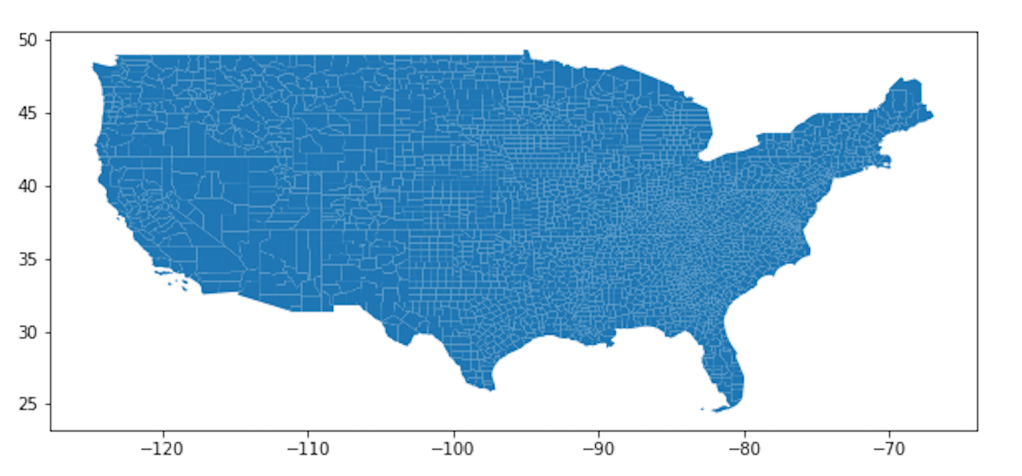
map_df_CONUS.plot(figsize = (10,10))
plt.show()

You can see all the counties in the contiguous United States.

Merging the Shapefile and Dataset

The Shapefile and the Dataset need to have a column in common in order to match the data to map. I decided to match by FIPS codes. To create the FIPS codes in the Shapefile:

map_df_CONUS['FIPS'] = map_df_CONUS.STATEFP + map_df_CONUS.COUNTYFP

To create the FIPS codes in the county data (Note: I filtered the data to only the year 2018 for simplicity):

max_temp_2018_df.State_Code = max_temp_2018_df.State_Code.apply(lambda x : "{0:0=2d}".format(x))

max_temp_2018_df.Division_Number = max_temp_2018_df.Division_Number.apply(lambda x : "{0:0=3d}".format(x))

max_temp_2018_df['FIPS'] = max_temp_2018_df.State_Code + max_temp_2018_df.Division_Number

Finally, to merge the Shapefile and Dataset:

merged_df = map_df_CONUS.merge(max_temp_2018_df, left_on = 'FIPS', right_on = 'FIPS', how = 'left')

Mapping (Finally!)

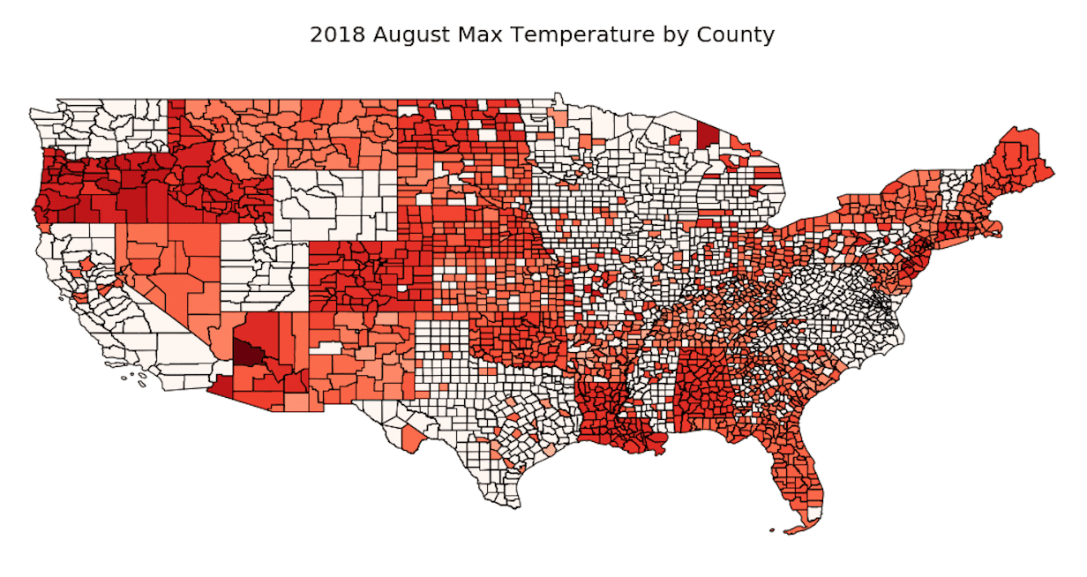
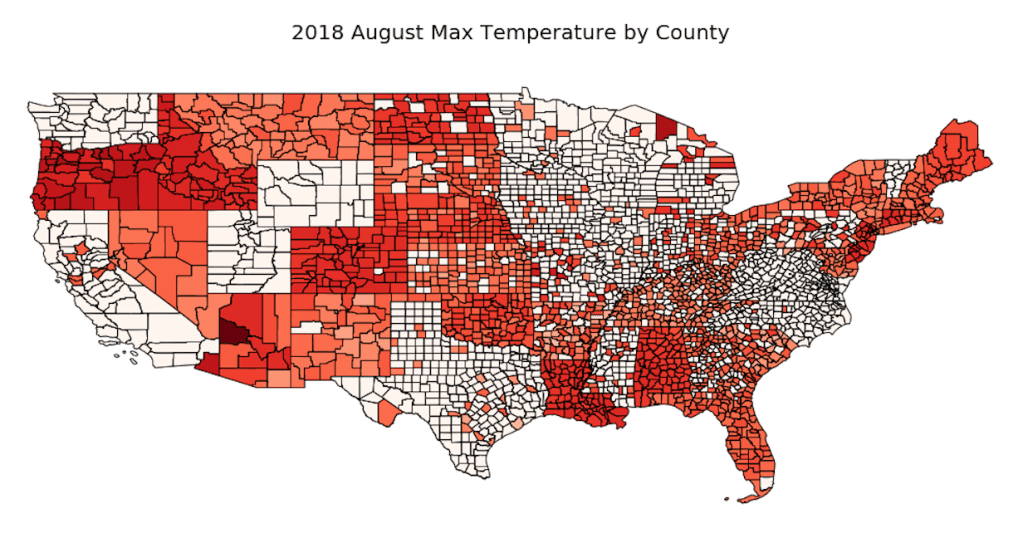
Finally, we get to map the data to the Shapefile. I used the geoplot.choropleth method to map the maximum temperature data on a scale. The darker the red, the hotter the maximum temperature was for a given county. The map was created for August 2018.

geoplot.choropleth(
    merged_df, hue = merged_df.Aug,
    cmap='Reds', figsize=(20, 20))
plt.title('2018 August Max Temperature by County', fontsize = 20)
plt.show()

Yay!

You can see we were able to plot the data on the county map of the US! I hope this demonstration helps!

Problems

Unfortunately you can see there is missing data. Additionally, I was able to generate a legend, but it would show up as about twice the size of the map itself, so I decided to remove it.